

The BYD key fob looks simple: four buttons, a small indicator light, and a hidden mechanical key. But several useful functions are not obvious from the icons — including window control, remote start, find-car mode, and an emergency start procedure when the battery is flat.
This guide explains the buttons, the hidden functions, and what to do when the key stops working.
Quick answer: lock and unlock are single presses. Double-click the trunk button to release the tailgate. Long-press lock to close the windows and long-press unlock to open them, if the setting is enabled. Long-press the start button for two seconds to remote-start the car. Press lock again while the car is armed to make it beep and flash so you can find it.
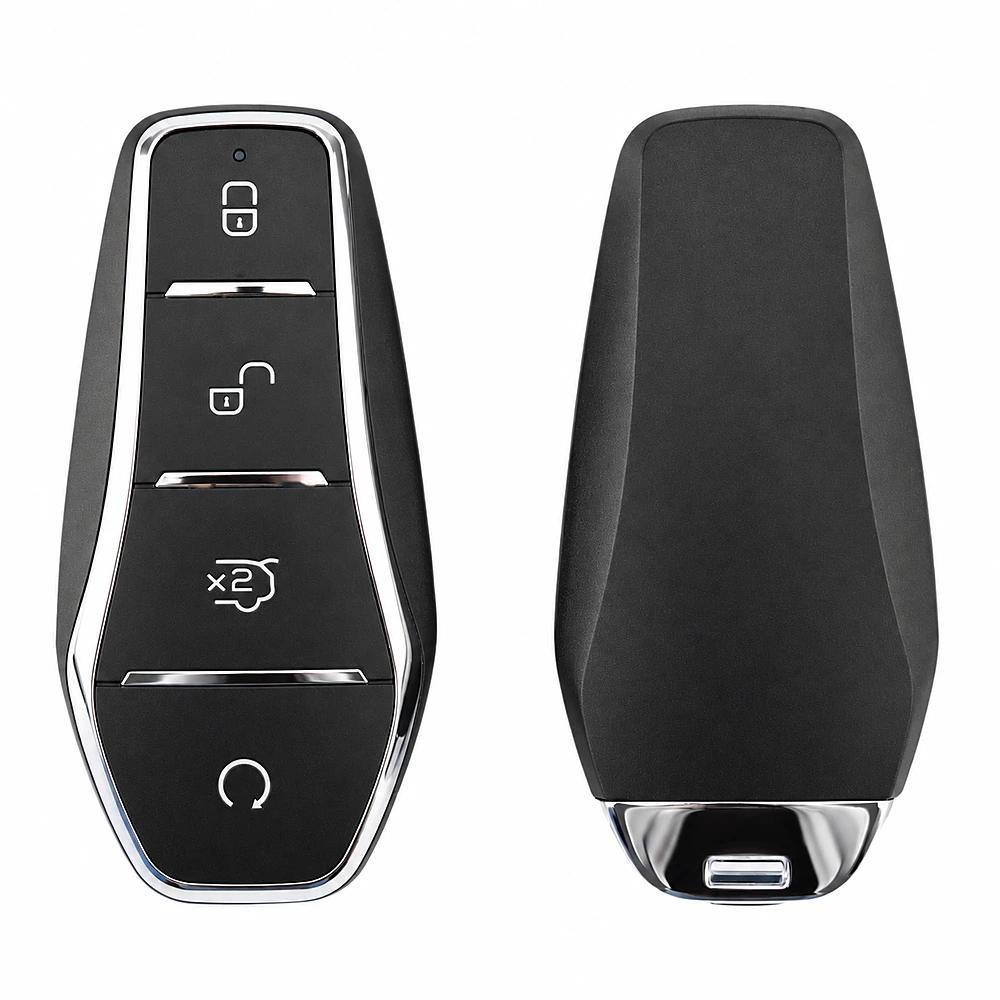
BYD key fob buttons at a glance
Most 2025 China-spec BYD key fobs use a four-button layout. The exact icons and labels vary by model and trim, but the logic is consistent.
| Button | Single press | Long press | Double press |
|---|---|---|---|
| Lock (closed padlock) | Locks all doors; hazard lights flash once | Closes all windows if enabled | — |
| Unlock (open padlock) | Unlocks all doors; hazard lights flash twice | Opens all windows if enabled | — |
| Trunk (car with open tailgate) | — | — | Releases the trunk or opens the power tailgate |
| Start/Stop (circular arrow) | — | Starts the car remotely; press again to stop | — |
There is also an indicator light and a mechanical key hidden inside the shell. Some models label the trunk button “back door”; the function is the same.
1. Lock and unlock — the basics
Press Lock once to lock all doors. The hazard lights flash once. If a door, the hood, or the tailgate is not fully closed, the car may still lock the closed doors, but the lights will not flash and the horn may sound once.
Press Unlock once to unlock all doors. The hazard lights flash twice. If you do not open a door within about 30 seconds, the car locks itself again to prevent accidental unlocking.
Range is about 30 metres in open conditions; buildings and radio interference reduce it.
2. Long-press to open or close the windows
This is one of the most useful hidden functions. On many BYD models, a long press of the Unlock button lowers all four windows, and a long press of the Lock button raises them.
The feature can be switched off. Check the vehicle settings under Doors and Locks → Window Settings or a similar menu. If the windows do not move, the function may be disabled, or the car may not support it on that trim.
Keep an eye on children and pets whenever the windows are moving.
3. Double-click the trunk button
Double-click the Trunk button to release the tailgate. On models with a power tailgate, the tailgate will open; on models without one, it will unlatch and you can lift it manually.
The hazard lights flash twice to confirm the command. If the tailgate does not release, check that the car is unlocked and that the tailgate is not obstructed.
4. Remote start — cool or warm the car before you get in
On models that support remote start, long-press the Start/Stop button for two seconds. The car starts, the hazard lights flash three times, and the climate system can begin to cool or warm the cabin.
Remote start has a timeout. If no one opens a door or performs another valid action within about 10 minutes, the car switches off and returns to OFF mode. To stop the engine manually, long-press the same button for two seconds.
Before remote starting, the car should be in P, the power mode OFF, and the speed below 5 km/h. Do not remote-start in a closed garage or any space with poor ventilation.
5. Find-car mode
If you cannot see the car in a busy car park, press Lock while the car is armed. The horn sounds and the hazard lights flash about 15 times. Press Lock again to repeat the sequence.
If the lights do not flash, a door or the tailgate may be open.
6. The key sleeps — and the mechanical key hides inside
After about one minute of sitting still, the fob enters a sleep state to reduce the risk of relay attacks. The micro-switch entry and some key functions may not respond until you move the fob or press a button. That is normal.
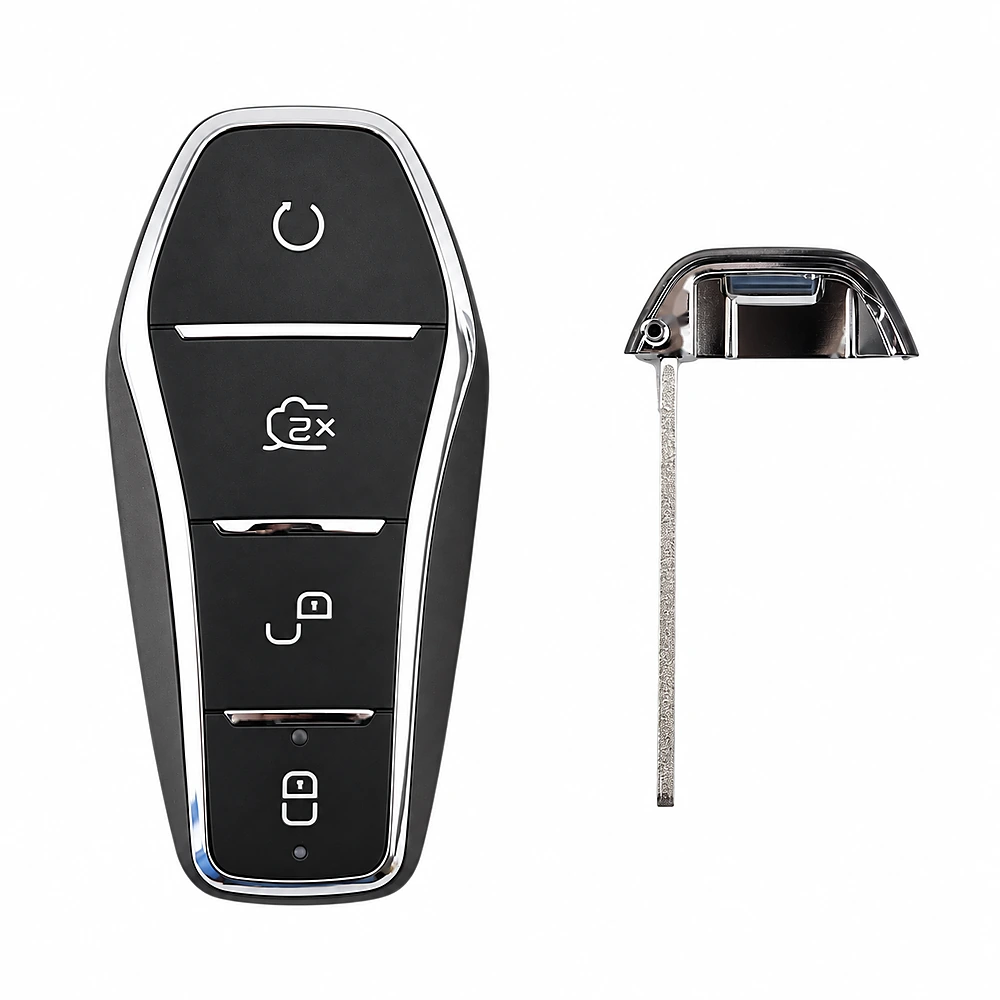
The mechanical key is inside the fob. Slide the release catch, pull the key head apart, and remove the blade. Use it in the driver’s door lock if the fob battery is flat or the car’s 12V battery is dead.
If the key battery is flat: emergency start
If the fob indicator does not light up and the car will not start, the battery may be flat. You can still start the car:
- Unlock the driver’s door with the mechanical key.
- Press the brake pedal and press the start button. The key warning light should come on and the car should beep once.
- Within about 30 seconds, hold the fob against the no-power-mode marker. On many models this is inside the centre console storage box.
- When the car beeps again and the warning light goes out, press the start button within about five seconds.
The marker position varies by model; check your owner’s manual. This procedure is for a flat key battery, not a flat high-voltage battery.
Key battery replacement
Most 2025 BYD fobs use a CR2032 coin cell, but some models use a different size. Check the old battery or the owner’s manual before buying a replacement. Open the shell carefully and note the battery orientation.
If the key is damaged, replace it through a BYD dealer; it is matched to the immobiliser.
Common key problems
| Symptom | Likely cause | What to do |
|---|---|---|
| Key does not lock or unlock | Flat battery, interference, or sleep mode | Press a button to wake the fob; move away from radio interference; replace the battery |
| Car will not start | Fob not detected or battery flat | Hold the fob near the start button or use the no-power-mode marker |
| Range is suddenly shorter | Weak battery or local interference | Replace the battery; test in a different location |
| Key locked inside | Key left in the cabin or trunk | The car may unlock or pop the trunk automatically; use the app or spare key if not |
| Alarm sounds when locking | A door, hood, or tailgate is not fully closed | Close all openings and lock again |
China-spec vs export: what changes
China-spec cars usually include the full keyless entry, NFC card, and remote-start set. Export versions may omit some functions or use a different fob design. If you are importing, confirm the key type, the number of fobs, and whether remote start is enabled in your market.
For a model-specific walkthrough, see our BYD Seal smart key guide. For the wider range, browse the BYD models page.
FAQ
How many buttons does a BYD key fob have?
Most 2025 China-spec BYD fobs have four buttons: lock, unlock, trunk, and start/stop. Some models rename the trunk button or add a function, but the layout is usually the same.
What does long-pressing the lock button do?
It closes all four windows on models that support the function. Long-pressing unlock opens them. The feature can be disabled in the vehicle settings.
How do I remote-start a BYD?
Long-press the start/stop button for two seconds. The car starts and the hazard lights flash three times. It shuts down after about 10 minutes if no one interacts with it.
Can I start the car with a dead key fob battery?
Yes. Use the mechanical key to unlock the door, then hold the fob against the no-power-mode marker and press the start button. The marker is usually in the centre console storage box; check your manual.
Why does my key not work after sitting overnight?
The fob may be in sleep mode to prevent relay attacks. Press a button or move it to wake it. If it still does not work, replace the battery.
References
- BYD. 2025 Seagull Owner’s Manual. BYD China, 2025.
- BYD. 2025 Seal 06 DM-i Owner’s Manual. BYD China, 2025.
- BYD. 2025 Sealion 06 DM-i Owner’s Manual. BYD China, 2025.
- BYD. 2025 Han DM-i Owner’s Manual. BYD China, 2025.
- BYD. User Manual Download Centre. byd.com/cn/user-manual.
Images: BYDCN media library.
Need a China-spec BYD with the right key and trim? Browse our BYD models or send us your requirement.

 English
 Portuguese
 French
 Turkish
 Russian
 Arabic
 Spanish